

Bring Digital Ceiling & Soffit Layout Directly to the Jobsite
Ceilings and soffits are where coordination gets hardest. Congested MEP zones, changing ceiling heights, and architectural details make traditional layout slow and error-prone. Small mistakes overhead often lead to rework, delays, and costly field adjustments.
With LightYX, coordinated CAD or BIM models are projected directly onto floor and ceiling surfaces, giving crews clear, visual guidance they can build from immediately. No tape measures. No string lines. No guesswork. Whether you’re laying out ceiling grids, soffits, bulkheads, or architectural features, LightYX turns digital design into full-scale, on-site layout — helping teams move faster while building exactly to plan.
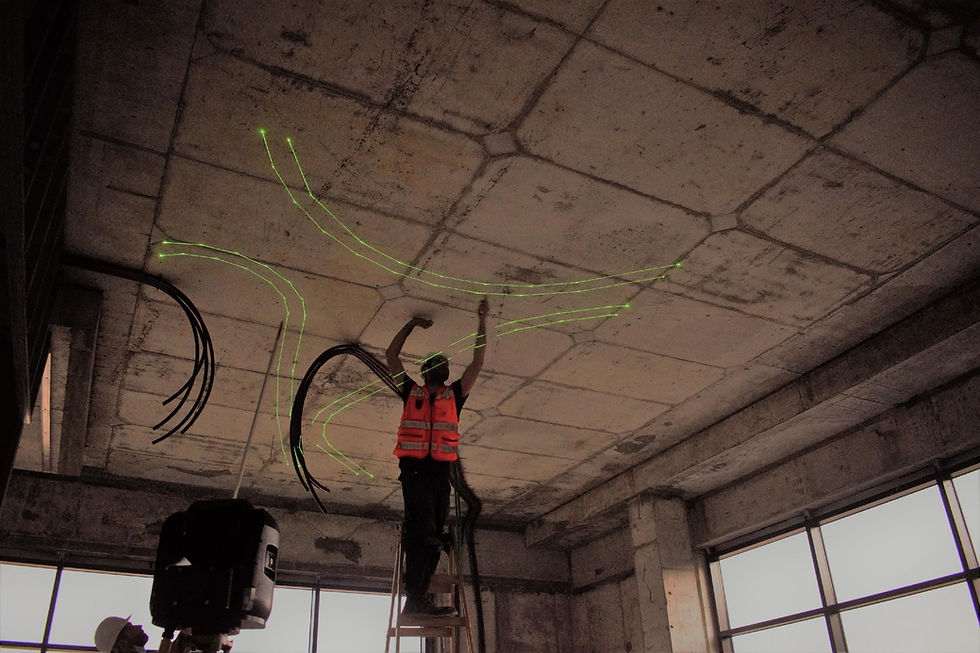
What LightYX Does for Ceilings & Soffits
LightYX enables confident ceiling and soffit layout from day one by projecting:
Ceiling Grid & Main Runner Paths: Precision lines for fast tee and perimeter channel installs.
Soffit & Bulkhead Framing: Full-scale footprints for complex vertical transitions and drops.
Hanger & Attachment Locations: Direct marks on the deck to eliminate manual measuring for threaded rods.
Light Fixture & HVAC Diffuser Cutouts: Exact positioning to ensure zero clashing with MEP.
Architectural Features & Clouds: Complex curves and geometric patterns laid out in seconds.
Height Elevation Changes: Visual cues for varying deck heights and stepped designs.
Furring & Leveling References: Accurate marks for wall-to-ceiling transitions.
All projected directly where crews work — on floors and ceilings — so installation starts immediately with clarity.
Why Ceiling & Interior Framing Contractors Choose LightYX
Start Installation Sooner – Layout and verification happen before panels arrive on site.
Improve Envelope Accuracy – Align anchors and embeds to coordinated models early.
Reduce Adjustments During Install – Catch deviations before façade systems go up.
Support Vertical Alignment – Maintain consistent geometry across multiple floors.
Scale Easily on Large Elevations – Repeat accurate layout across long façades and stacked levels.


How It Works
Sync: Import your coordinated CAD or BIM files directly into the platform.
Align: Quickly lock the LightYX laser to your jobsite control points.
Project: Cast 1:1 scale layouts for ceilings, soffits, and hangers onto the work surface.
Build: Crews follow the visual guide—no manual measuring or interpretation required.
Verify: Eliminate coordination errors and rework before the first stud is even placed.
Simple, visual, and engineered for the reality of the jobsite.
Built for Commercial Ceilings & Architectural Framing
LightYX supports steel framing workflows across office and tenant improvement projects, multifamily and mixed-use buildings, healthcare and education facilities, and hospitality and retail interiors.
Anywhere light-gauge steel meets tight schedules and complex coordination, LightYX helps teams deliver faster with higher confidence.
Get started with LightYX Steel Framing Layout — turn coordinated drawings into clear, actionable steel layout on floors and ceilings so your crews build right the first time.

Cartier – Troy Somerset
PROJECT TYPE
Retail
OUTCOMES
1600 LF of layout in 8 hours
LOCATION
Michigan
LAYOUT SCOPE
1600 Linear feet of complex Framing layout


Chase Sapphire Lounge at LaGuardia Airport
PROJECT TYPE
Leisure space
OUTCOMES
7370 LF of curved layout in 6 days
LOCATION
New Jersey
LAYOUT SCOPE
Framing layout, Curved layout for slab cut


Ilôt O – ZAC Euratlantique
PROJECT TYPE
Commercial
OUTCOMES
Finished in 9 days instead of 59
LOCATION
France
LAYOUT SCOPE
Multiple point projection on the ceilings


PLEASE FILL IN YOUR CONTACT DETAILS
_edited.png)
READY TO ILLUMINATE YOUR CONSTRUCTION PROCESS?
Share a bit of information, and we'll connect you with a LightYX expert to explore our offerings. Discover how the LightYX platform can seamlessly integrate into your workflow for enhanced efficiency and precision
FAQ
What is laser layout and how do general contractors use it?
General contractors use laser layout to coordinate multiple trades by projecting shared design information directly onto the jobsite.
How does digital layout technology improve accuracy for general contractors?
Digital layout ensures all trades work from the same coordinated design, reducing interpretation errors.
How does laser layout help manage multiple trades on site?
Laser layout aligns trades to the same reference, improving coordination and reducing conflicts.
Can laser layout reduce coordination issues and RFIs?
Yes. Visualizing design intent on site can help identify issues earlier and reduce RFIs.
Is laser layout difficult to implement on active jobsites?
Laser layout systems are designed for field use and can be integrated into existing workflows.