-Photoroom.avif)


QML800 Interior Layout Tool: Use Cases and Modern Alternatives
Understand how the discontinued QML800 worked, where it excelled, and which modern digital layout tools now serve interior construction teams.

Interior construction layout has always been a critical — and error-prone — phase of building construction. Long before BIM became standard, crews relied on tape measures, chalk lines, plumb bobs, and manual offsets to translate drawings into physical reality.
The introduction of digital layout tools marked a turning point. Among the most impactful of these tools was the Trimble QML800 QuickMark Layout System, a product that helped many drywall, framing, and interior construction teams move from manual layout to model-based execution.
Today, the QML800 is no longer available. Contractors who relied on it are asking an important question:
What replaced the QML800 — and what is the best modern alternative for interior layout today?
This article explains:
- What the QML800 was and how it worked
- Why it was successful for interior framing and drywall
- Why it ultimately became obsolete
- What modern layout technologies have replaced it
- When robotic total stations still make sense
- Where full-scale visual layout systems like LightYX fit
What Was the Trimble QML800 QuickMark Layout System?
The QML800 QuickMark Layout System was an indoor construction layout tool developed by Spectra Precision, part of the Trimble portfolio. It was designed specifically for interior construction workflows, including drywall layout, metal framing, MEP rough-in, and ceiling coordination.

At a high level, the system consisted of:
- Two laser positioning units mounted on tripods
- A tablet (Android-based) running Trimble layout software
- CAD-based digital layout files imported into the system
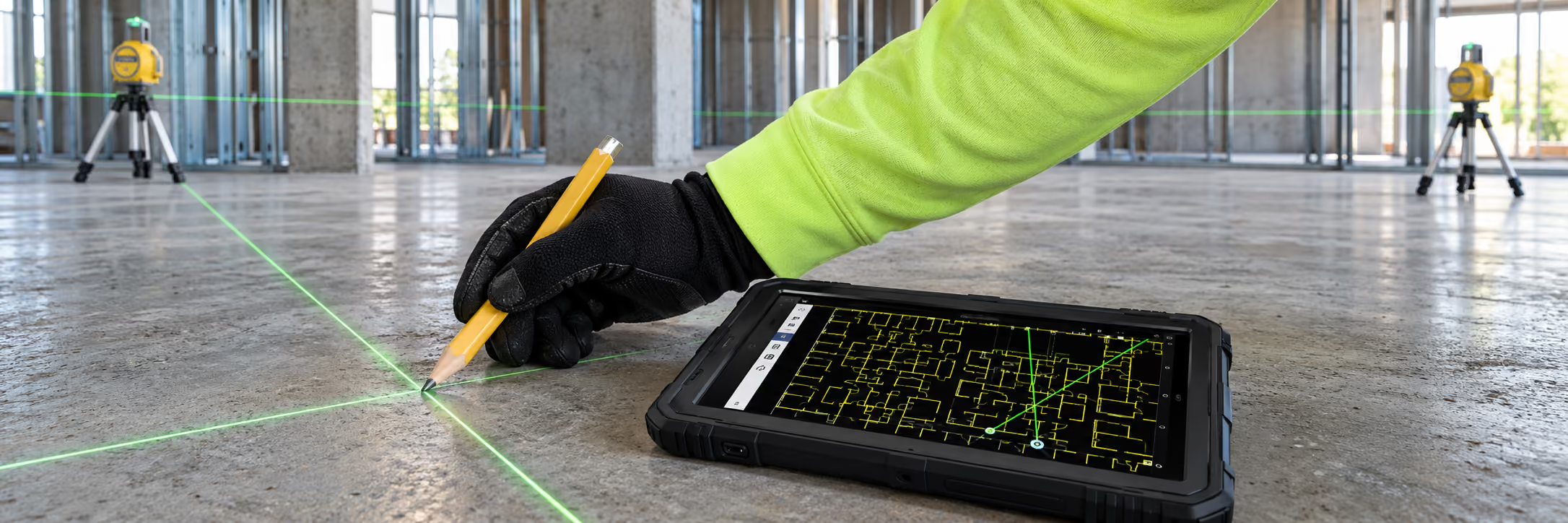
Instead of measuring distances manually, users selected points directly on a digital floor plan displayed on the tablet. The QML800 positioned its laser beams so they intersected precisely at the selected point on the slab or ceiling.
This created a visible “X” marking the exact layout location.
In practice, this allowed crews to:
- Lay out wall start points
- Mark stud locations
- Define openings and offsets
- Place MEP reference points
All without pulling tape or snapping repeated chalk lines.
Why the QML800 Was Successful for Interior Construction
The QML800 solved several long-standing problems in interior layout, which explains why it gained traction among drywall and framing contractors.
1. It Eliminated Chained Measurement Errors
Traditional layout relies on chained measurements — each new measurement depends on the accuracy of the previous one. Errors accumulate quickly.
The QML800 placed each point independently from the digital model. This dramatically reduced cumulative error and improved consistency across large interior areas.
2. It Connected Digital Drawings to the Jobsite
One of the QML800’s biggest advantages was its ability to work directly from CAD files.
Instead of interpreting printed drawings:
- The layout existed digitally
- Points were selected visually
- The system executed layout directly
This reduced misinterpretation and improved alignment between design intent and field execution.
3. It Was Accessible to Non-Surveyors
Unlike survey instruments, the QML800 was designed for trade crews, not survey professionals.
Key advantages:
- Minimal setup complexity
- Tablet-based interface
- Short learning curve
Drywall and framing crews could become productive quickly, without needing survey training.
4. It Was Fast Enough for Interior Work
The system provided layout accuracy suitable for interior construction tolerances (typically around 1/8 inch or ~3 mm). This was sufficient for:
- Drywall track layout
- Interior framing
- Most MEP rough-in tasks
Compared to manual methods, productivity gains were significant.
5. It Fit Interior Environments Well
The QML800 was purpose-built for indoor environments:
- No GNSS dependency
- Works under roofs
- Compact footprint
This made it practical on active jobsites where space and lighting conditions varied.
Limitations of the QML800
Despite its success, the QML800 had inherent limitations that became more apparent as construction technology evolved.
1. Point-Only Layout
The QML800 was fundamentally a point-layout system.
It could place accurate points, but:
- It did not project continuous lines
- It did not show full wall geometry
- Crews still had to connect points manually
This left room for interpretation errors between points.
2. Limited Scale and Range
The system was optimized for smaller interior zones. Larger open interiors required frequent repositioning and recalibration, reducing efficiency.
3. No Full-Scale Visual Context
Because the system marked points only, crews still needed to:
- Interpret drawings
- Understand relationships between points
- Translate point data into finished geometry
As projects became more complex, this became a bottleneck.
4. Aging Software and Hardware
The QML800 relied on older Android tablets and software frameworks. Over time:
- BIM workflows advanced
- Model complexity increased
- Expectations for visualization and verification grew
The system could not easily evolve to meet these demands.
5. No Integrated Verification Loop
The QML800 helped place points, but it did not verify:
- Whether work was installed correctly
- Whether deviations occurred
- Whether as-built conditions matched the model
Modern construction increasingly requires closed-loop verification.
Why the QML800 Became Obsolete
The QML800 did not fail — it was outpaced.
Construction moved toward:
- Fully coordinated BIM models
- Model-driven execution
- Visual, continuous layout
- Multi-trade coordination
Point-only systems became insufficient for many interior workflows. As a result, Trimble discontinued the QML800, and the industry shifted toward more capable layout technologies.
What Replaced the QML800?
Today, there are two practical categories of tools that replace the QML800, depending on workflow needs:
- Robotic Total Stations (RTS)
- Full-Scale Visual Layout Systems (e.g., LightYX)
Both are valid — but they solve different problems.
Option 1: Robotic Total Stations as a QML800 Replacement
Robotic total stations are survey-grade instruments that can stake out digital points with very high accuracy.
When RTS Is the Right Replacement
A robotic total station is a good replacement for QML800 when:
- You need only individual layout points
- Accuracy is critical
- Outdoor or mixed indoor/outdoor work is required
- Survey control already exists
In these cases, an RTS provides:
- Greater accuracy than QML800
- Longer range
- More flexibility across environments
Trade-Offs of Robotic Total Stations
However, RTS systems:
- Are more expensive
- Require prisms or tracking targets
- Often require more training
- Still rely on point-by-point workflows
For interior trades, this can feel like overkill when full visual layout is desired.
Option 2: Full-Scale Visual Layout as the Modern Evolution
Full-scale visual layout systems represent a conceptual shift from point-based layout.
Instead of marking points, these systems:
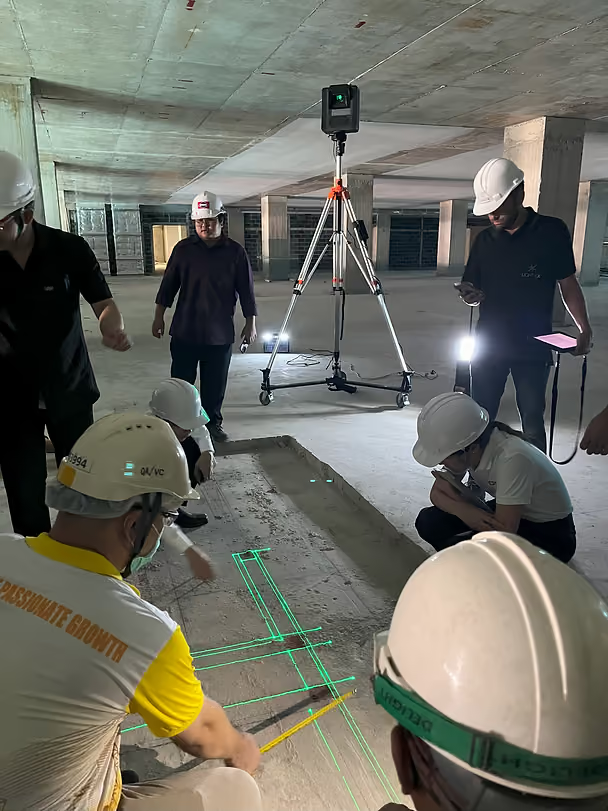
- Project entire layouts at 1:1 scale
- Show walls, penetrations, openings, and geometry
- Allow crews to build directly from what they see
How LightYX Replaces QML800
LightYX can be viewed as the natural evolution of the QML800 concept:
QML800
LightYX
Point-based layout
Full-scale visual layout
Mark then interpret
See and build directly
Single-trade focus
Multi-trade coordination
No verification
Continuous visual verification
LightYX is especially effective for:
- Interior framing and drywall
- MEP coordination
- Complex layouts
- Prefabrication alignment
Instead of asking crews to connect dots, LightYX removes interpretation entirely.
Choosing the Right Tool Today
There is no single “best” tool — only the best tool for the job.
Choose a Robotic Total Station if:
- You need precise point stakeout
- You work indoors and outdoors
- You already run survey workflows
Choose Full-Scale Visual Layout if:
- You want faster interior layout
- You work from BIM models
- You want less interpretation and rework
- You coordinate multiple trades
The Bigger Shift: From Measurement to Execution
The QML800 represented a major step forward by bringing digital data into interior layout. But modern construction demands more.
The industry has moved from:
- Measuring → marking → interpreting
To:
- Model → visual execution → verification
This is why full-scale layout systems are gaining adoption — not because point layout is wrong, but because visual execution scales better in complex interiors.
Final Thoughts
The Trimble QML800 played an important role in modernizing interior construction layout. It helped prove that digital layout was faster, more accurate, and more scalable than tape and chalk.
Today, its legacy lives on in more advanced tools.
- Robotic total stations remain the best option for precision point layout
- Full-scale visual layout systems like LightYX represent the next step for interior construction
Understanding the strengths of each allows contractors to choose the right tool — and avoid forcing outdated workflows onto modern projects.
.avif)